
Proton Pass Review
A privacy-first, end-to-end encrypted password manager from the Swiss team behind Proton Mail. A genuinely generous free tier, one of the cheapest paid plans, and its best value inside the Proton bundle.

Proton Pass is an open-source, end-to-end encrypted password manager from Proton, the Swiss company behind Proton Mail and Proton VPN. The free plan is unusually generous: unlimited logins, notes, cards, devices, passkeys, and 10 hide-my-email aliases. Pass Plus costs $2.99 per month billed annually ($35.88 per year), adding unlimited aliases, a built-in 2FA authenticator, Dark Web Monitoring, and secure sharing. Its real edge is privacy: Swiss jurisdiction, GPLv3 open-source code, independent audits by Cure53 and Recurity Labs, and integrated SimpleLogin aliases. The catch is maturity: it launched in 2023, so business and admin features trail 1Password and Bitwarden. Best value if you already want Proton Unlimited at $9.99 per month.
Key factsBest for: Privacy-focused individuals already in, or considering, the…
- An open-source, Swiss, end-to-end encrypted password manager with built-in aliases and a genuinely useful free tier.
- Founded: 2014 (Proton)
- Headquarters: Geneva, Switzerland
- Alternatives covered: 1Password, Bitwarden, Dashlane, NordPass
Pros
- End-to-end encryption on all fields, open-source code (GPLv3), and independent audits by Cure53 and Recurity Labs.
- Unusually generous free plan and one of the cheapest paid tiers among major managers.
- Integrated SimpleLogin aliases, built-in 2FA, passkeys, and Swiss privacy jurisdiction.
Cons
- Younger than 1Password and Bitwarden, so some polish and edge cases are still maturing.
- Business, admin, and team-management features trail the incumbents.
- Best value really lands only inside the Proton Unlimited bundle.
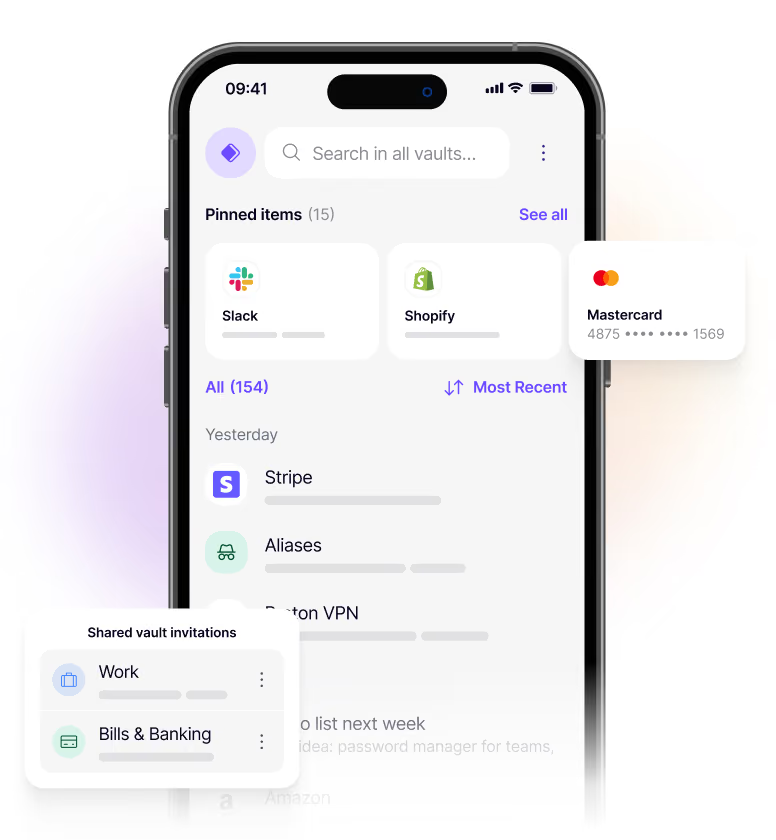
Proton Pass is the youngest product in a lineup that made its name on privacy. Proton, the Swiss company behind Proton Mail, Proton VPN, and Proton Drive, launched Pass in 2023 as a password manager built on the same end-to-end encryption that protects the rest of its ecosystem. For a security-conscious reader, that lineage matters more than a feature checklist.
This review is written for people who treat their password manager as part of their threat model, not just a convenience.
We look at what Proton Pass actually encrypts, how its open-source code and independent audits hold up, what the free and paid plans really cost, where it is genuinely strong, and where a three-year-old product still trails incumbents like 1Password and Bitwarden.
We also cover who should pick something else, and five alternatives worth comparing before you commit.
What is Proton Pass?
Proton Pass is a cloud, end-to-end encrypted password manager made by Proton AG, founded in 2014 by scientists who met at CERN and headquartered near Geneva, Switzerland. It stores logins, passkeys, credit cards, encrypted notes, and identities in encrypted vaults that sync across every device.
The defining detail is what gets encrypted. Proton Pass does not just encrypt the password field. It applies end-to-end, zero-knowledge encryption to usernames, web addresses, notes, and other fields, so Proton itself cannot see which services you use or what you store.
That is a stronger default than several mainstream managers, which leave metadata like saved URLs readable on the server.
Two things set it apart from rivals. First, integrated email aliases through SimpleLogin, the alias service Proton acquired in 2022, so you can create disposable hide-my-email addresses without leaving the app.
Second, the Proton ecosystem: the same account includes Proton Mail, Calendar, VPN, and Drive, and the paid Pass plan folds neatly into the Proton Unlimited bundle.
How Proton Pass works
Setup is familiar. You create or sign in with a Proton account, install the apps for Windows, macOS, Linux, iOS, and Android, and add the browser extension for Chrome, Firefox, Safari, Edge, or Brave. Importing from another manager or a browser is a guided step, and autofill works across websites and native apps once you grant permissions.
Day to day, most of the work is invisible. The extension offers to save and autofill logins, the password generator creates strong credentials, and the built-in 2FA authenticator stores and fills TOTP codes so you can retire a separate authenticator app.
Passkeys are supported across devices for phishing-resistant sign-ins, and a SimpleLogin alias is one click away whenever a site asks for an email.
Security features run in the background. Dark Web Monitoring alerts you when your credentials appear in a breach, and Proton Sentinel, an advanced account-protection program, adds combined human and AI monitoring for high-risk accounts.
Emergency Access lets a trusted contact reach your vault if something happens to you. The rough edges are maturity ones: admin tooling, reporting, and team management are thinner than the older competitors.
Proton Pass key features
Proton Pass pricing
Proton Pass, 1Password, Bitwarden, Dashlane, and NordPass all publish prices, and none are quote-only. Proton Free is $0 with no credit card, and Bitwarden and NordPass also have free plans. 1Password offers a 14-day trial, and Dashlane's personal plans have no free tier.
The cheapest regular-price paid entry is Bitwarden Premium at $19.80 a year, while Proton Pass Plus is $2.99 a month billed yearly and NordPass Premium leads with an introductory two-year rate.
Prices jump at Dashlane Premium, 1Password Business ($8.99 per user a month billed yearly), and Proton Unlimited ($9.99 a month billed yearly). NordPass introductory rates renew higher, and Dashlane offers a Friends and Family plan while NordPass offers a Family plan.
Proton has no business-only Pass tier as mature as 1Password or Bitwarden, so teams should compare Proton for Business with those two.
| Plan | Price | Best for |
|---|---|---|
| Proton Pass Plus | $2.99/mo billed yearly ($35.88/yr) | Unlimited aliases, 2FA, sharing, file attachments |
| Proton Pass Plus (monthly) | $4.99/mo, month to month | Same Plus features, paid month to month |
| Proton Unlimited | $9.99/mo yearly (about $119.88/yr) | Pass Plus plus Mail, Calendar, VPN, and Drive |
| Proton Unlimited (monthly) | $12.99/mo, month to month | Same Unlimited bundle, billed month to month |
| 1Password Individual | $2.99/mo billed yearly | One person, first-year promo; $3.99/mo regular |
| 1Password Families | $4.49/mo billed yearly | Up to 5 people, first-year promo, then $5.99/mo billed yearly |
| 1Password Business | $8.99/user/mo billed yearly | Business plan, 14-day trial |
| Bitwarden Premium | $1.65/mo, $19.80/year | Cheapest regular-price paid tier in this group |
| Bitwarden Families | $3.99/mo billed yearly ($47.88/yr) | Six users on the family plan |
| Bitwarden Teams | $4/user/mo billed yearly | Business tier with directory sync and SCIM |
| Dashlane Premium | $64.99/yr (US App Store) | Individual plan with VPN, billed yearly, no free tier |
| NordPass Premium | Check current pricing | Introductory two-year rate, renews higher |
Proton Pass pros and cons
What we like
- End-to-end encryption on all fields, open-source code (GPLv3), and independent audits by Cure53 and Recurity Labs.
- Unusually generous free plan and one of the cheapest paid tiers among major managers.
- Integrated SimpleLogin aliases, built-in 2FA, passkeys, and Swiss privacy jurisdiction.
What could be better
- Younger than 1Password and Bitwarden, so some polish and edge cases are still maturing.
- Business, admin, and team-management features trail the incumbents.
- Best value really lands only inside the Proton Unlimited bundle.
Who Proton Pass is for
Proton Pass is a strong fit for privacy-conscious individuals who want end-to-end encryption they can verify, Swiss data jurisdiction, and email aliases baked in.
If you already use Proton Mail or Proton VPN, or you are considering the Proton Unlimited bundle, it is close to a default choice, and the free plan makes it easy to try with zero risk.
It also suits people leaving a browser's built-in manager or a spreadsheet who want a real security tool without a real bill. The generous free tier, passkey support, and one-click aliases make it a clean upgrade.
It is a weaker fit in a few cases. Larger teams that need deep admin controls, provisioning, granular roles, and reporting will find Proton Pass younger and lighter than 1Password. Anyone who wants to self-host their vault should look at Bitwarden instead.
And if you have no interest in the wider Proton ecosystem, the paid plan's best value, the bundle, is lost on you, though Pass Plus still stands on its own.
Best Proton Pass alternatives
If Proton Pass is not the right fit, these are the closest options.
| Tool | Best for | Starts at | |
|---|---|---|---|
| Proton Pass | Privacy-focused individuals already in, or considering, the Proton ecosystem who want end-to-end encryption and email aliases. | From $2.99/mo (Pass Plus, $35.88 billed yearly) | Visit → |
| 1Password | Individuals, families, and businesses that want the most polished, feature-complete manager with strong admin controls. | From $2.99/mo (Individual, first year, billed yearly) | Visit → |
| Bitwarden | Budget-conscious users and open-source purists who want a capable free tier and the option to self-host. | From $1.65/mo (Premium, $19.80 billed yearly) | Visit → |
| Dashlane | Users who want a slick interface with a built-in VPN and proactive dark web monitoring. | Premium $64.99 a year on the US App Store, with a VPN included | Visit → |
| NordPass | NordVPN users who want a cheap, modern password manager inside the same ecosystem. | Premium on an introductory two-year rate that renews higher | Visit → |



The bottom line
Proton Pass is the privacy pick. If your priority is end-to-end encryption on every field, open-source code, independent audits, and Swiss jurisdiction, it is the strongest option here, and the free plan alone beats most paid competitors. Built-in SimpleLogin aliases and a 2FA authenticator make it more than a vault.
The trade-off is maturity. Launched in 2023, it trails 1Password and Bitwarden on business tooling, admin controls, and the last ten percent of polish.
Choose Proton Pass if you value privacy and already want, or could use, the Proton bundle. If you need the most complete business features, look at 1Password; if you want the cheapest capable option or self-hosting, Bitwarden wins; and if a slick interface with a bundled VPN matters more, compare Dashlane and NordPass.
Frequently asked questions
How much does Proton Pass cost?
Is Proton Pass secure?
Is the Proton Pass free plan good enough?
Proton Pass vs 1Password and Bitwarden: which is best?
Does Proton Pass support 2FA, passkeys, and email aliases?
Sources
Prices and plan details come from each vendor's own pricing page, re-checked by the Toolradar pricing tracker.
- Proton Pass pricingchecked Sep 2026
- 1Password pricingchecked Sep 2026
- Bitwarden pricingchecked Sep 2026
- Dashlane pricingchecked Sep 2026
- NordPass pricingchecked Sep 2026
Some offers on this page may be paid placements or contain affiliate links.
Get the Cyberpresso brief
Free daily newsletter, read in 5 minutes.
Subscribe free