
1Password Review
The most polished password manager for teams that value security and ease over price. Ideal for businesses and IT, but overkill for solo users on a tight budget.

1Password is the most polished password manager you can buy, and for security-minded teams it is worth the premium. Plans run from $2.99/month for one person to $8.99/user/month for Business, with a flat $24.95/month Teams pack for 10 people and a 14-day trial but no free plan.
Its biggest strength is trust: the Secret Key model and a clean breach record put it ahead on security, with the cleanest interface in the category. The biggest catch is price and the missing free tier. If budget matters most, Bitwarden delivers nearly the same core features free or far cheaper.
Key factsBest for: Security-conscious businesses and IT teams that want single…
- The most polished password manager, built for teams that value security and ease over saving money.
- Founded: 2005
- Headquarters: Toronto, Canada
- Free plan: No, 14-day trial
- Alternatives covered: Bitwarden, Dashlane, Keeper Security, Proton Pass, NordPass
Pros
- Two-secret Secret Key model and a clean breach record make it one of the most trusted vaults available.
- Best interface and autofill in the category, plus strong admin, SSO and developer tooling.
- Handles passwords, passkeys, TOTP codes, SSH keys and secrets in one product.
Cons
- No free plan, and it is priced above nearly every direct competitor.
- Losing your Secret Key with no signed-in device means unrecoverable data for individual users.
- The CLI and secrets automation have a steeper learning curve than the consumer app suggests.
1Password has spent nearly two decades building a reputation as the password manager you recommend to people who do not want to think about password managers. It started as a Mac utility from Canadian maker AgileBits and now protects logins, passkeys, SSH keys and secrets for more than 150,000 businesses.
The real question is not whether it works, but whether the polish justifies paying more than nearly every rival, including several with free tiers.
This review looks at what you actually get for the money: the security model, the day-to-day autofill experience, the admin and developer tooling, and where 1Password quietly falls short. We weigh it against Bitwarden, Dashlane, Keeper, Proton Pass and NordPass so you can see when the premium is justified and when a cheaper tool covers the same ground. Security teams and IT admins are the audience it was built for.
What is 1Password?
1Password is a password manager and secrets platform made by AgileBits, a company founded in 2005 and headquartered in Toronto. At its core it stores logins, credit cards, secure notes, software licenses and identity documents in end-to-end encrypted vaults that sync across Mac, Windows, Linux, iOS, Android and every major browser.
What sets it apart is the two-secret model: your data is locked by both an account password and a 128-bit Secret Key stored on your devices, so even 1Password cannot decrypt your vault.
Beyond storing passwords, it generates and saves passkeys, acts as a built-in TOTP authenticator, and includes Watchtower, a dashboard that flags weak, reused and breached passwords using Have I Been Pwned data. Travel Mode can temporarily remove vaults from a device before you cross a border.
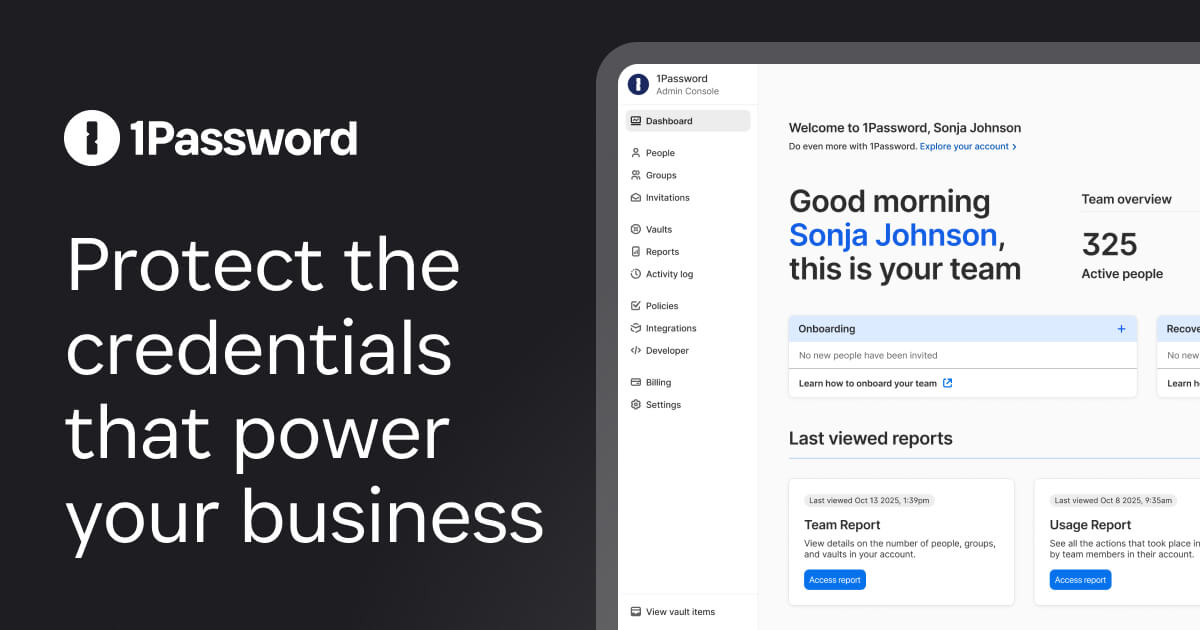
For teams there are shared vaults, granular permissions, SSO sign-in with Okta or Entra ID, SCIM provisioning, and an activity log that streams events to Splunk or Elastic. For developers, the CLI, SSH agent, Git commit signing and Service Accounts turn it into a secrets manager. It sits at the premium, security-first end of the market.
How 1Password works
Setup starts by creating an account, setting your account password, and saving the Emergency Kit PDF that holds your Secret Key. That Secret Key is both the catch and the strength: lose it with no other signed-in device and there is no password reset and no recovery.
For teams, an admin can recover a locked-out member, but individual users carry real responsibility for that file.
Day to day you live in the browser extension. It detects login fields, offers to fill and save, and prompts to generate strong passwords on signup forms. The desktop app is where you organize vaults, run Watchtower, and manage sharing.
Autofill on mobile hooks into the iOS and Android system password menus. Sharing is genuinely well done: you can send an encrypted link that expires or requires a specific recipient.
The interface is the cleanest in the category, and opening the vault with Touch ID, Windows Hello or a passkey removes most daily friction. Rough edges: the CLI and secrets automation have a learning curve, and there is no free tier to fall back on if you stop paying.
1Password key features
1Password pricing
1Password, Bitwarden, Dashlane, Keeper, Proton Pass and NordPass publish prices. Enterprise is a custom quote for 1Password, Keeper and NordPass, some Keeper modules cost extra, and Extended Access Management is priced separately.
Bitwarden, Proton Pass and NordPass include a free plan; Dashlane ended its free plan in September 2025.
1Password has no free plan, only a 14-day trial, and the monthly rate costs more than annual. The cheapest credible entry is Bitwarden's free plan, with Premium at $19.80/year.
Costs jump on Business at about $9 a seat, so 25 people run around $225/month. 1Password, Bitwarden, Keeper and Proton prices were checked on each vendor's pricing page in September 2026.
| Plan | Price | Best for |
|---|---|---|
| 1Password Individual | $2.99/mo billed yearly | One person, first-year promo for new customers, then $3.99/mo billed yearly |
| 1Password Individual (monthly) | $4.99/mo billed monthly | One person, month to month |
| 1Password Families | $4.49/mo billed yearly | Up to 5 members, first-year promo for new customers, then $5.99/mo billed yearly |
| 1Password Families (monthly) | $7.99/mo billed monthly | Up to 5 members, month to month |
| 1Password Teams Starter Pack | $24.95/mo for 10, roughly $2.50/seat | Flat pack with admin controls |
| 1Password Business | $8.99/user/mo, billed yearly | Sign-on, policies, reporting, 20 guest invites, free Families |
| 1Password Enterprise | Custom quote | Provisioning, event streaming and a success manager |
| Bitwarden Premium | $19.80/year | Individual paid plan |
| Bitwarden Families | $47.88/year for 6 people | Family plan for six people |
| Bitwarden Teams | $4/user/mo | Team plan, priced per user |
| Bitwarden Enterprise | $6/user/mo | Enterprise plan, priced per user |
| Dashlane Premium | Around $5/month | Individual paid plan |
| Dashlane Business | Around $8/user/mo, yearly | Business seats, billed annually |
| Keeper Personal | $42.99/year | Individual plan, about $3.58/month |
| Keeper Family | $91.99/year, about $7.67/month | Family plan |
| Keeper Business | $4/user/mo, billed yearly | Base price, some modules cost extra |
| Keeper Enterprise | Custom quote | Large organizations |
| Proton Pass Plus | $35.88/year, or $4.99 billed monthly | Individual paid plan |
| Proton Pass (Unlimited bundle) | Included in Proton Unlimited | Bundled if you already pay for Proton |
| Proton Pass Business | From $1.99/user/mo, billed yearly | Business plans, priced per user |
| NordPass Premium | Around $2/month | Individual paid plan |
| NordPass Business | Around $3.60/user/mo | Business plan, priced per user |
| NordPass Enterprise | Custom quote | Large organizations |
1Password pros and cons
What we like
- Two-secret Secret Key model and a clean breach record make it one of the most trusted vaults available.
- Best interface and autofill in the category, plus strong admin, SSO and developer tooling.
- Handles passwords, passkeys, TOTP codes, SSH keys and secrets in one product.
What could be better
- No free plan, and it is priced above nearly every direct competitor.
- Losing your Secret Key with no signed-in device means unrecoverable data for individual users.
- The CLI and secrets automation have a steeper learning curve than the consumer app suggests.
Who 1Password is for
1Password is a strong fit for security-conscious businesses and IT teams that want SSO, provisioning and audit logging without standing up separate infrastructure.
It suits companies already in the Okta or Entra ecosystem, developer teams that need a real secrets manager alongside a password vault, and non-technical users who will actually use a tool because it stays out of the way. If polish and support drive adoption on your team, 1Password earns its premium.
Who should skip it: solo users and tiny teams on a tight budget, and anyone who wants a capable free plan.
A single person who just needs strong passwords across devices gets nearly everything 1Password offers from Bitwarden's free tier or Proton Pass for a fraction of the cost. Open-source purists will prefer Bitwarden's auditable, self-hostable code, and privacy-first individuals already paying for Proton services get Proton Pass bundled in.
Best 1Password alternatives
If 1Password is not the right fit, these are the closest options.
| Tool | Best for | Starts at | |
|---|---|---|---|
| 1Password | Security-conscious businesses and IT teams that want single sign-on, provisioning and audit logs. | From $2.99/mo (Individual, billed yearly) | Visit → |
| Bitwarden | Budget-conscious users and open-source-minded teams that want a self-hosting option. | From $19.80/year (Premium) | Visit → |
| Dashlane | Individuals and teams wanting a polished app with a built-in VPN and dark web monitoring. | Premium or Friends & Family only | Visit → |
| Keeper Security | Regulated businesses that need compliance reporting, detailed controls and add-on secrets management. | From $3.58/mo (Personal, $42.99 billed yearly) | Visit → |
| Proton Pass | Privacy-first individuals and teams already using Proton Mail, VPN or Drive. | From $35.88/year (Pass Plus) | Visit → |
| NordPass | Individuals and small businesses wanting a simple, affordable manager from Nord Security. | From around $2/month (Premium) | Visit → |


The bottom line
1Password is the best-executed password manager on the market, and for teams that value security posture, clean UX and responsive support, it is worth the premium. The Secret Key model, spotless breach record, and genuinely useful admin and developer tooling justify paying more than rivals.
For a business standardizing on one tool and integrating SSO, it is the safe, defensible choice.
The catch is price and the absence of a free plan. If you are a solo user, a hobbyist, or a small team watching every dollar, the value math tips toward alternatives.
Choose Bitwarden if you want open source or a real free tier, Proton Pass if you live in the Proton ecosystem, and Keeper or Dashlane if compliance reporting or a specific integration matters more than 1Password's polish. Buy 1Password when the premium buys adoption and peace of mind, not out of habit.
Frequently asked questions
How much does 1Password cost?
Is 1Password worth it?
Does 1Password have a free plan?
What are the best 1Password alternatives?
Has 1Password ever been breached?
Sources
Prices and plan details come from each vendor's own pricing page, re-checked by the Toolradar pricing tracker.
- 1Password pricingchecked Sep 2026
- Bitwarden pricingchecked Sep 2026
- Dashlane pricingchecked Sep 2026
- Keeper Security pricingchecked Sep 2026
- Proton Pass pricingchecked Sep 2026
- NordPass pricingchecked Sep 2026
Some offers on this page may be paid placements or contain affiliate links.
Get the Cyberpresso brief
Free daily newsletter, read in 5 minutes.
Subscribe free