
CrashPlan Review 2026: Business Backup Pricing, Pros and Cons
What CrashPlan's endpoint, server and Microsoft 365 backup plans cost a company under 250 people, where its own pages disagree, and how Backblaze, IDrive, Carbonite and Veeam compare, with prices read in November 2026.

CrashPlan is worth it for a small business that needs Windows, Mac and Linux laptops backed up with unlimited versions, at $7.33 a month per user billed $88 a year. It is priced per user, not per device: the fair use policy says one license covers either one or up to four devices depending on the offering. Servers cost $189 a year each with 250 GB of pooled storage, and Microsoft 365 or Google Workspace backup is $30 per user a year on the main pricing page.
A 25-person company with one file server and Microsoft 365 pays $3,229 a year on annual billing, by our arithmetic. The catches are a 14-day trial that takes a card and bills on day 15, orders that are non-refundable, deleted files kept for 90 days at most, and two CrashPlan pages that quote different prices for SaaS backup. Choose Backblaze for a Mac and Windows fleet at a flat per-computer price, IDrive Team for the lowest bill on 25 computers, and CrashPlan when Linux machines and servers must sit in the same console as the laptops. Prices were checked on CrashPlan's pricing pages on November 9, 2026.
Key factsBest for: Teams under 250 users with Linux, Mac and Windows endpoints…
- Per-user endpoint backup with unlimited versioning, plus server and SaaS plans, all in one console.
- Free trial: 14 days with a card at signup, charged on day 15 unless you cancel.
- Deleted files: Kept for 90 days at most on endpoints, while file versions follow your policy.
- Toolradar data: 37 cloud storage tools evaluated in Toolradar's November 2026 ranking.
- Alternatives covered: Backblaze, IDrive, Carbonite, Veeam
Pros
- Agents for Windows, Windows on ARM, macOS and Linux under one per-user license.
- Unlimited versioning, immutable backups and per-user encryption keys on the small-business plans.
- Servers, Microsoft 365 and Google Workspace have public per-unit prices, so a full bill can be built before calling sales.
Cons
- Deleted endpoint files are kept for 90 days at most, and orders are non-refundable once the trial ends.
- Its pages disagree on SaaS pricing and on whether endpoint storage is unlimited or 50 GB per user.
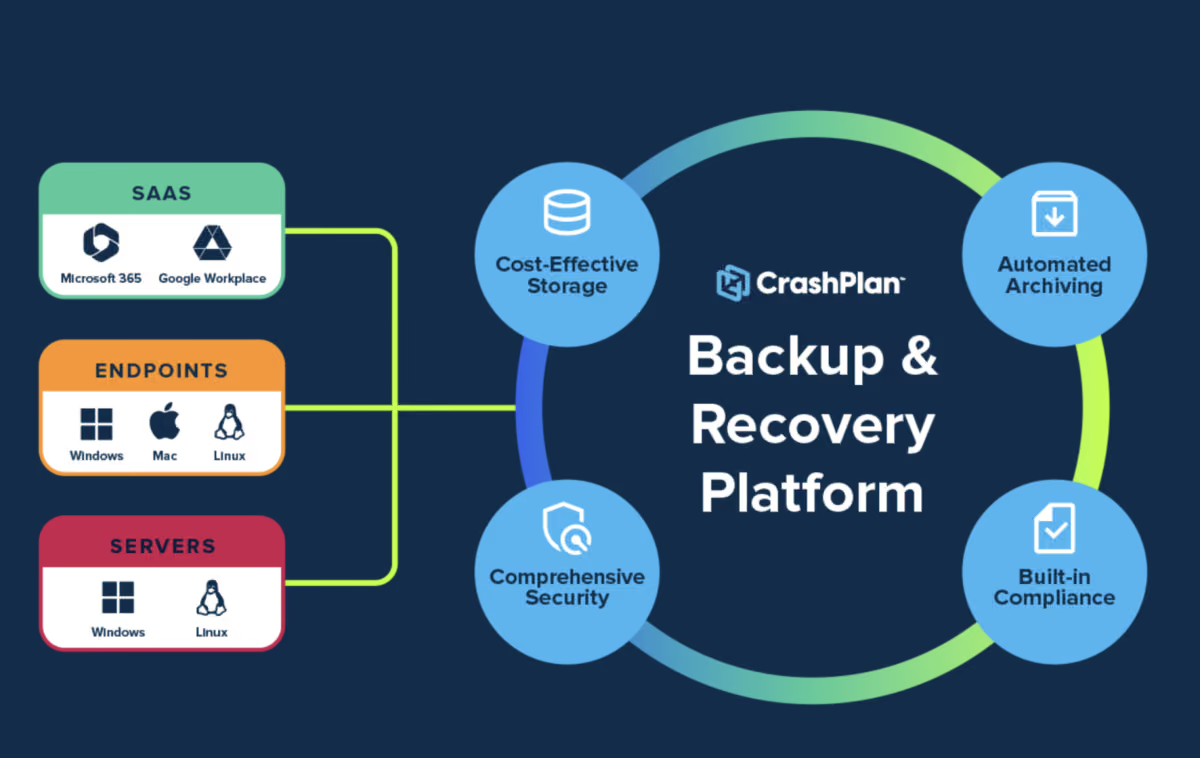
CrashPlan is the backup product a small IT team picks when the fleet is mixed. It licenses per user rather than per machine, ships agents for Windows, Windows on ARM, macOS and Linux, and puts laptops, servers and Microsoft 365 in one console.
That makes it the most complete self-serve option for a company of 20 to 250 people, and also the one whose pricing pages need the closest reading.
This review prices every CrashPlan small-business plan from the vendor's own pages and works out the bill for a 25-person company. It also lists the limits that sit in the FAQ and the fair use policy rather than on the plan cards, then sets the result against Backblaze, IDrive, Carbonite and Veeam.
It is written for the security lead or one-person IT function who has to show, after a ransomware event or a stolen laptop, that every machine and the file server come back.
What is CrashPlan?
CrashPlan is a cloud backup service for business data on employee computers, Windows and Linux servers, Microsoft 365 and Google Workspace. It sells on two tracks. Organizations under 250 users sign up online at published rates.
At 250 users and above, or once you need your own storage, single sign-on, legal hold or a dedicated success manager, pricing moves to a quote. A company under 250 people buys the small-business plans, and everything on this page is priced for that track.
The enterprise platform adds bring-your-own storage in Azure, AWS, Wasabi, Backblaze or any S3-compatible target, Microsoft Entra ID integration, role-based access and delegated administration. On the small-business plans, data goes to CrashPlan's own data centers in the United States, which matters for a European subsidiary with residency rules.
Buyers who remember the Code42 name should know that CrashPlan's endpoint backup page now describes CrashPlan as an independent company, distinct from Code42. CrashPlan has no profile on Toolradar yet; the alternatives below link to theirs.
How CrashPlan works
Setup starts with a 14-day trial with full functionality on endpoints, servers, Microsoft 365 or Google Workspace. You enter a card at signup; it is not charged if you cancel before the trial ends, and the paid subscription starts on day 15.
An admin then deploys the agent, sets backup policies for file selection, versions and retention, and watches device health from one console. Backups run automatically and incrementally, with deduplication and compression, so an employee does nothing after the install.
Restores are self-serve: an employee can bring back one file version or a whole folder without a ticket. IT can also restore on the user's behalf to the original machine or a new one, so the same tool handles the laptop refresh. The small-business FAQ says recently used files are restored first.
Security is AES-256 at rest, TLS in transit, per-user encryption keys, immutable backups and optional two-factor sign-in, and the vendor lists SOC 1, SOC 2 and ISO 27001.
Two limits shape the ransomware case. Deleted files on endpoints are kept for 90 days at most, so a folder deleted in January and missed until May is gone. Versions of files that still exist, by contrast, follow whatever policy you set.
And the fair use policy says unlimited storage covers standard endpoint backups only: network-mapped drives, servers and NAS devices are excluded and belong on the server plan.
CrashPlan key features
CrashPlan pricing
CrashPlan prices were checked on November 9, 2026 on the main pricing page and the small-business pricing page, both in USD for organizations under 250 users. Endpoints cost $88 a year per user, or $158 every two years ($6.58 a month). Servers cost $15.75 per server a month, billed annually, or $284 every two years ($11.83 a month), with 250 GB of pooled storage per server. Extra storage is $90 a year per 250 GB. A server or SaaS account that runs over its pool gets that block added automatically at $7.50 a month, prorated to the end of the term, so overage shows up on the bill without a purchase order.
The SaaS price depends on which CrashPlan page you read. The main pricing page lists Microsoft 365 and Google Workspace backup at $2.50 per user a month, billed $30 a year or $60 every two years. An archived copy of the same page from October 26, 2026 shows $3.67 a month, billed $44 a year or $79 every two years. The small-business pricing page still carried those older figures on November 9. Budget on the lower figure but confirm it at checkout, because on a 25-person tenant the gap is $350 a year (our arithmetic: 25 users times the $14 difference).
The 25-person scenario, our arithmetic on printed annual prices: 25 endpoint licenses come to $2,200; one file server holding 400 GB costs its yearly license plus one storage block, $279; 25 Microsoft 365 seats add $750. Total: $3,229 a year, or $3,579 if the older SaaS price applies. Endpoints alone on the two-year term cost $3,950 for two years, $1,975 a year, which saves $225 a year against annual billing.
Alternatives, read on each vendor's pricing page the same day. Backblaze Business Backup is $99 a year per computer with unlimited data, so 25 computers cost $2,475, or $275 more than CrashPlan endpoints. Its native clients cover Mac and Windows only. IDrive Team is $49.99 a month on yearly billing for 25 computers, 25 users and 25 TB, which is $599.88 a year by our arithmetic. New signups pay $34.99 a month in the first year under a limited-time offer. IDrive Business covers servers, Exchange, SQL and NAS from $19.99 a month for 500 GB. Carbonite Core lists at $287.99 a year for up to 25 computers, external drives and NAS sharing one small storage pool. It was shown at $230.39 during a 20% holiday promotion, and extra storage costs $99 per 100 GB. Veeam Backup & Replication Community Edition is free for up to 10 workloads, servers and laptops included, as a download you run yourself.
Toolradar data: Toolradar, the software directory we run, evaluated 37 cloud storage tools for its cloud storage ranking updated November 8, 2026; 5 of its top 10 have a free plan, and CrashPlan is not yet in the catalog.
| Plan | Price | Best for |
|---|---|---|
| CrashPlan Endpoints | $88/user/year, or $158 for two years | Windows, macOS and Linux, unlimited versioning, self-serve restore and device migration |
| CrashPlan Servers | $189/server/year, or $284 for two years | Windows and Linux servers, 250 GB pooled storage per server, unlimited retention and restores |
| CrashPlan Microsoft 365 | $30/user/year on the main pricing page ($44 on the small-business page) | Exchange Online, SharePoint and OneDrive, 50 GB pooled storage per user |
| CrashPlan Google Workspace | $30/user/year on the main pricing page ($44 on the small-business page) | Gmail and Google Drive, 50 GB pooled storage per user |
| CrashPlan add-on storage | $90/year per 250 GB | Extra pooled storage for servers and SaaS backup, added automatically on overage |
| CrashPlan Enterprise | Custom | 250+ users, your own storage, SSO, legal hold and a dedicated success manager |
| Backblaze Business Backup | $99/year per computer | Unlimited data per computer, Mac and Windows clients, free mailed restore drive |
| IDrive Team (25 computers) | $49.99/mo billed yearly, $34.99 in year one for new signups | 25 computers, 25 users and 25 TB of storage |
| IDrive Business 500 GB | $19.99/mo billed yearly | Unlimited users, computers, servers, Exchange, SQL and NAS devices |
| Carbonite Core | $287.99/year list, $230.39 in the holiday promotion | Up to 25 computers, external drives and NAS sharing 250 GB |
| Veeam Community Edition | Free | Up to 10 workloads, from virtual machines and servers to laptops and NAS |
CrashPlan pros and cons
What we like
- Agents for Windows, Windows on ARM, macOS and Linux under one per-user license.
- Unlimited versioning, immutable backups and per-user encryption keys on the small-business plans.
- Servers, Microsoft 365 and Google Workspace have public per-unit prices, so a full bill can be built before calling sales.
What could be better
- Deleted endpoint files are kept for 90 days at most, and orders are non-refundable once the trial ends.
- Its pages disagree on SaaS pricing and on whether endpoint storage is unlimited or 50 GB per user.
Who CrashPlan is for
CrashPlan fits a company of roughly 10 to 250 people with a mixed fleet: developers on Linux, finance on Windows, design on Mac, plus one or two file servers and a Microsoft 365 or Google Workspace tenant.
It suits a one-person IT function that wants one console and one bill for all of it, and a security lead who needs unlimited versions and immutable copies behind a ransomware plan. If you have Linux laptops and a server to protect, CrashPlan prices both on the same public page and backs them up in the same console.
Three buyers should skip it. A Mac and Windows shop with no server gets a simpler contract from Backblaze's flat per-computer fee and free mailed restore drive. A tight budget goes further on IDrive Team, which costs a fraction of the CrashPlan bill for 25 computers.
And anyone who needs a refund window should know that CrashPlan's terms make orders non-refundable and renewals continue until you cancel through support. For the wider recovery plan, see our ransomware response playbook.
New backup threats land in the daily brief: subscribe to Cyberpresso free.
Best CrashPlan alternatives
If CrashPlan is not the right fit, these are the closest options.
| Tool | Best for | Starts at | |
|---|---|---|---|
| CrashPlan | Teams under 250 users with Linux, Mac and Windows endpoints plus servers or Microsoft 365 to protect. | Endpoints $88/user/year | Visit → |
| Backblaze | Mac and Windows fleets with no server, where a flat per-computer price is the whole budget. | Personal Backup $99/year · Business Backup $99/year · custom-priced pl | Visit → |
| IDrive | Budget-bound teams, and companies that want servers, SQL and NAS under one pooled plan. | Free plan · IDrive® Personal $11.99/mo · IDrive® Team $11.99/mo · IDri | Visit → |
| Carbonite | Small offices that want one yearly fee for up to 25 computers and modest data volumes. | Basic $8/mo on the annual plan · Plus $11/mo on the annual plan · Prim | Visit → |
| Veeam | Teams with virtual machines or servers who can run their own backup software and storage. | Community Edition free for up to 10 workloads | Visit → |


The bottom line
CrashPlan is the right buy when a company under 250 people has a mixed fleet and wants laptops, Linux machines, file servers and Microsoft 365 in one console at published prices. A 25-person company with one server and Microsoft 365 pays $3,229 a year by our arithmetic, for unlimited versions, immutable copies and self-serve restores. Pay for two years if the fleet is stable, because the endpoint saving is $225 a year on 25 users, but remember that orders are non-refundable.
Before you sign, get two answers in writing. First, which Microsoft 365 price your checkout applies; second, whether your endpoint plan is unlimited or 50 GB per user, since CrashPlan's own pages say both. If the fleet is Mac and Windows only, Backblaze is simpler; if the budget rules, IDrive Team is cheaper; if you run virtual machines, look at Veeam.
Related reading on this site: the best backup software for small business ranking, our Backblaze review and Backblaze alternatives, the IDrive review, IDrive pricing and IDrive vs Backblaze, Backblaze pricing, the best ransomware protection, the report on ransomware that destroys backups and the ConnectWise cloud backup credential theft. Product records for Backblaze, IDrive, Carbonite and Veeam are on Toolradar.
Methodology: every price was checked on the vendor's own pricing page on November 9, 2026, and CrashPlan's limits were read on its small-business pricing FAQ, fair use policy and terms and conditions the same day. The earlier SaaS price comes from an archived copy of CrashPlan's pricing page dated October 26, 2026. Promotional prices are labeled next to the list price. Yearly and fleet totals are our arithmetic on printed prices, with no tax. We run no test lab and award no star rating.
Cite this: Cyberpresso, "CrashPlan Review 2026: Business Backup Pricing, Pros and Cons", November 2026.
Frequently asked questions
How much does CrashPlan cost per device?
Is CrashPlan worth it for a small business in 2026?
Is CrashPlan storage really unlimited?
Does CrashPlan have a free trial?
CrashPlan or Backblaze for small business backup?
Does CrashPlan back up Microsoft 365 and Google Workspace?
Some offers on this page may be paid placements or contain affiliate links.
Get the Cyberpresso brief
Free daily newsletter, read in 5 minutes.
Subscribe free